In my previous post, I covered how to configure TDE with OKV as the initial keystore for the database. In this post, Ill cover how to migrate an existing TDE keystore from a file based wallet to OKV. I typically recommend this manual approach for anyone doing this for the first time. Once a person is familiar with all the steps in the process, they could automate all of this using the OKV RESTful API.
Below is the starting point of my TDE configuration. I have the WALLET_ROOT set and I am using a file based keystore as my primary and only keystore for my database.
sys@ORCL> !cat /home/oracle/scripts/wstatus.sqlset lines 200column WRL_PARAMETER format a40select * from v$encryption_wallet;sys@ORCL> show parameter rootNAME TYPE VALUE------------------------------------ ----------- ------------------------------wallet_root string /u01/app/oracle/admin/orcl/walletsys@ORCL> show parameter tdeNAME TYPE VALUE------------------------------------ ----------- ------------------------------one_step_plugin_for_pdb_with_tde boolean FALSEtde_configuration string keystore_configuration=FILE
OKV Configuration
First, I login to my OKV server UI as a user with System Admin privileges so I can register a new Endpoint.
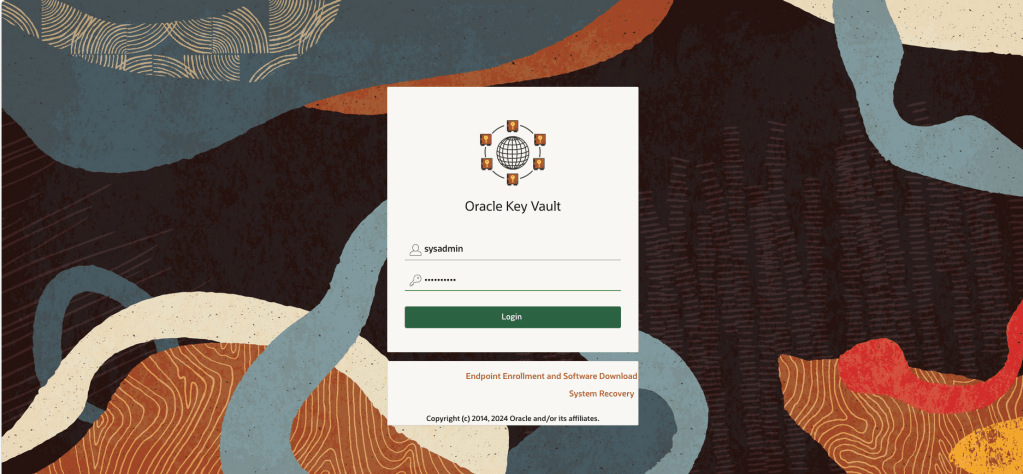
After logging in successfully, click the Endpoints tab, then click the Add button

On the Add Endpoint page, enter a Name, Description and Admin email address. The latter two are optional. Click Register.
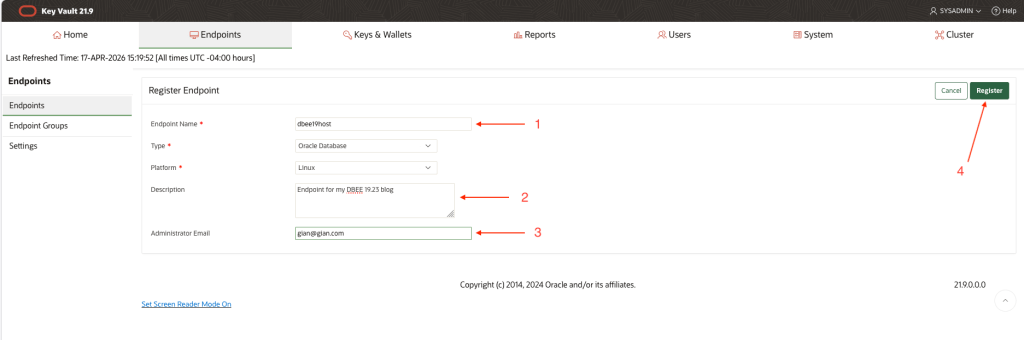
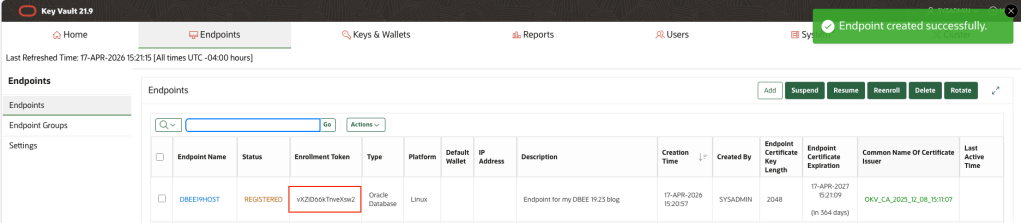
Copy the endpoint token to a note in your text editor of choice, you will use this in a future step. Logout.
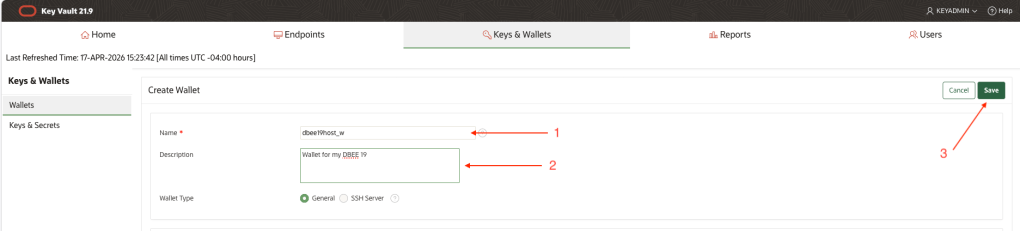
In the next few steps that follow, we will create a new Virtual Wallet for our Endpoint and set this Virtual Wallet to be the default one for our Endpoint. To to that, login as a user with the Key Administrator role

Click the Keys & Wallets tab, then click, Create.

Give your new Virtual Wallet a name, a a Description if desired, then click Save
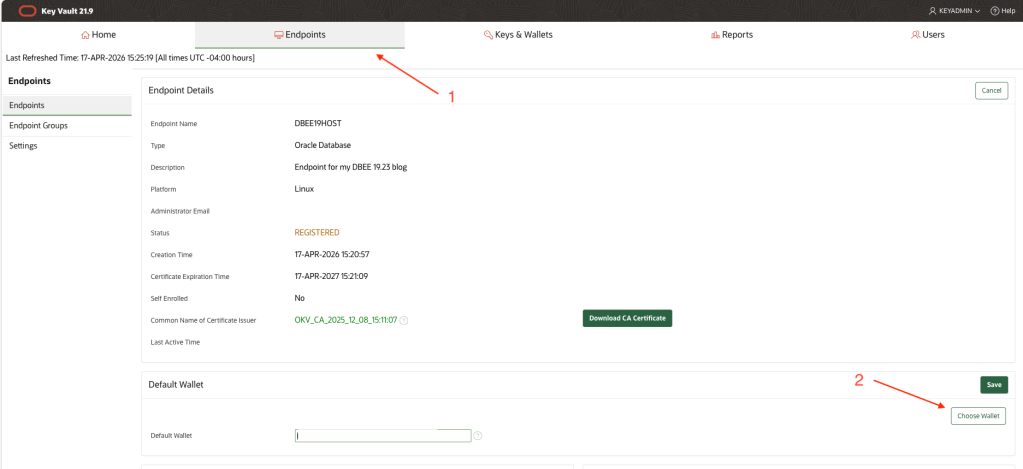
Select the Endpoints tab, the click Choose Wallet
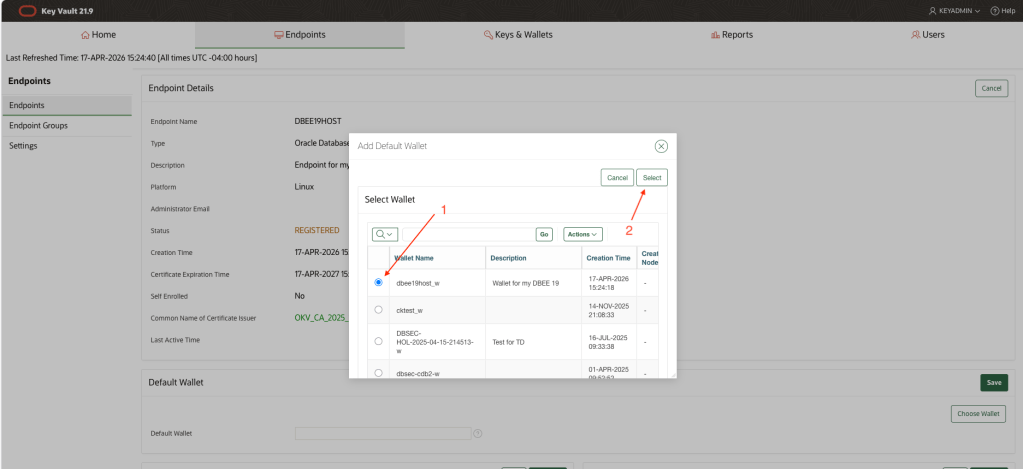
Check the radio button next to the wallet you previously created, then click Select.
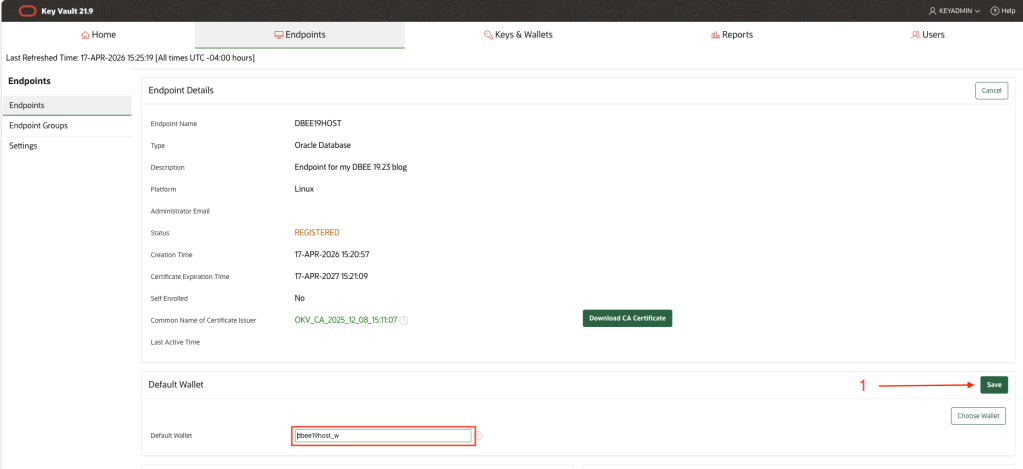
Note that, the Default Wallet field is now populated with your wallet name. Click Save.
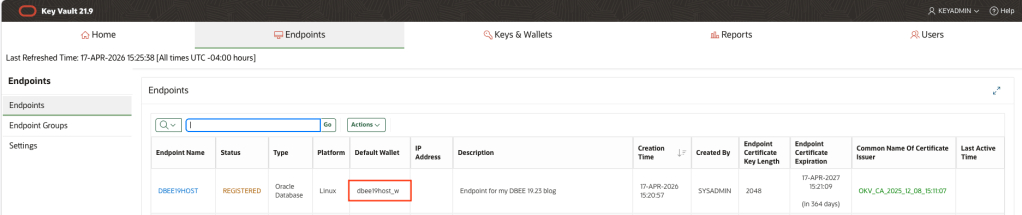
Back on the Endpoints tab, note the default wallet field is now also populated with your default wallet. Logout.
In the next sequence of steps, you will use the Enrollment Token you saved earlier to Enroll your Endpoint and Download the Endpoint software which will be installed on your database server. This Endpoint Enrollment package (okvclient.jar) is unique for each endpoint. The package contains TLS certificates which encrypt traffic between database server and OKV server and the same certs are used to identify the specific Endpoint.
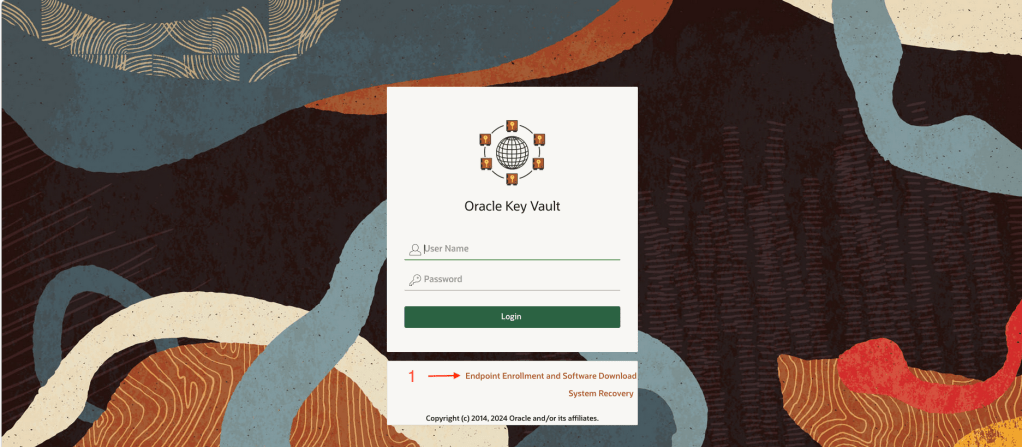
On the Login page, click the Endpoint Enrollment and Software Download link.
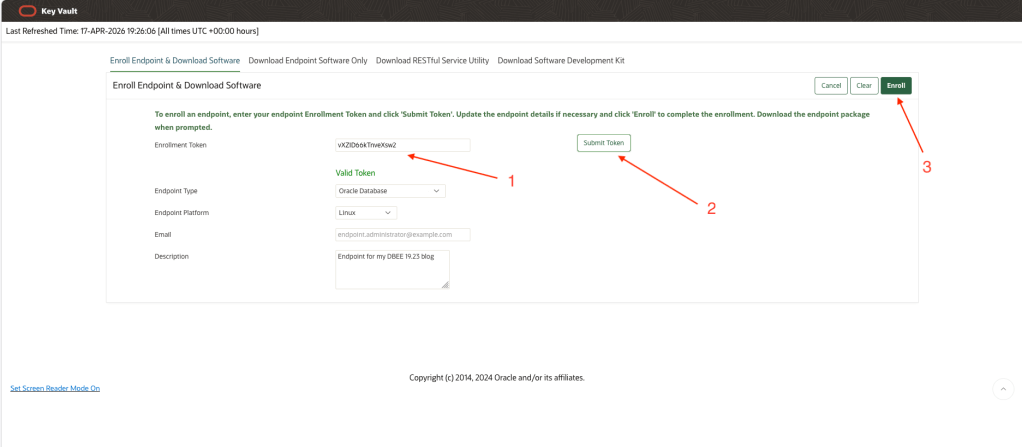
Paste in the Enrollment Token and click Submit Token. This step validates that the token is valid and has not been previously used. Next, click the Enroll button. This will generate the unique okvclient.jar file for your database and begin the download process. Save this okvclient.jar file to your local machine or to a shared network drive. You will need to copy it to the database server.
Database Preparation & Configuration
Once you have copied the okvclient.jar to the “okv” subdirectory below WALLET_ROOT, validate you have a recent version of Oracle Java installed (use Oracle Java in your ORACLE_HOME if necessary).
[oracle@dbee19host okv]$ pwd/u01/app/oracle/admin/orcl/wallet/okv[oracle@dbee19host okv]$ ls -ltotal 8876-rw-r--r--. 1 oracle oinstall 9085676 Apr 17 19:29 okvclient.jar[oracle@dbee19host okv]$ java -versionjava version "11.0.27" 2025-04-15 LTSJava(TM) SE Runtime Environment 18.9 (build 11.0.27+8-LTS-232)Java HotSpot(TM) 64-Bit Server VM 18.9 (build 11.0.27+8-LTS-232, mixed mode)
Install the Endpoint software using the command in the code snippet below. Make sure to enter an Endpoint Password when prompted. This Endpoint Password is similar to a wallet password.
[oracle@dbee19host okv]$ java -jar okvclient.jarDetected JAVA_HOME: /usr/lib/jvm/jdk-11.0.27-oracle-x64Enter new Key Vault endpoint password (<enter> for auto-login):Confirm new Key Vault endpoint password:The endpoint software for Oracle Key Vault installed successfully.Deleted the file : /u01/app/oracle/admin/orcl/wallet/okv/okvclient.jar
As a user with root privileges, run the root.sh script to copy the pkcs library to the designated directory below /opt
[oracle@dbee19host okv]$ sudo ./bin/root.shCreating directory: /opt/oracle/extapi/64/hsm/oracle/1.0.0/Copying PKCS library to /opt/oracle/extapi/64/hsm/oracle/1.0.0/Setting PKCS library file permissionsInstallation successful.[oracle@dbee19host okv]$
Now we need to upload the contents of the file based wallet into our Virtual Wallet in OKV.
[oracle@dbee19host okv]$ ./bin/okvutil upload -l /u01/app/oracle/admin/orcl/wallet/tde -t walletEnter source wallet password:Enter Oracle Key Vault endpoint password:Upload succeeded[oracle@dbee19host okv]$ ./bin/okvutil listEnter Oracle Key Vault endpoint password:Unique ID Type Identifier23579273-E95E-49CD-930F-D91FBAA4A247 Opaque Object TDE Wallet Metadata2739B595-7603-58ED-B664-F4299776E0B7 Symmetric Key TDE Master Encryption Key: MKID AfwxDePjcU+Jv5MAThtLvaUAAAAAAAAAAA5E2FDC01-9FB9-4908-B645-4EB7EEAFFF6C Template Default template for DBEE19HOST8CBBD09F-6626-4DCD-A7CE-7394AFE938F4 Opaque Object TDE Wallet MetadataB3E2BB6B-7A32-4382-BF05-E9A9E0931795 Secret Data Oracle Secret Data: ID OKV_PASSWORDC1DC9C3F-2867-49FE-95C3-99876F27CEE7 Opaque Object Certificate RequestE68B275B-CFF7-413E-9A3F-0DF9D8FF1358 Opaque Object TDE Wallet MetadataEECB0DEE-5DC3-4D98-B60C-B731C39F782E Private Key -F358DF59-2E20-40D9-98E8-6B4439979BD8 Opaque Object TDE Wallet MetadataFE17DABB-04EA-5CA1-90B8-EFE720E63D23 Symmetric Key TDE Master Encryption Key: MKID AcCbGigSwU8Cv9oo9gtw5HQAAAAAAAAAAA[oracle@dbee19host okv]$
Add the Endpoint Password to the existing file based wallet. This will enable the database to automatically open the connection to OKV after the keystore migration. You can choose not to do this but that will mean that you / someone will need to manually open the connection each time the database is restarted
sys@ORCL> administer key management add secret 'Oracle123' for client 'OKV_PASSWORD' force keystore identified by Oracle123 with backup;
Next, update the TDE_CONFIGURATION parameter to “keystore_configuration=OKV|FILE”. This will set OKV to be the primary keystore for the database and leave the file based wallet as a secondary keystore. New TDE master keys will be created in OKV following the keystore migration.
sys@ORCL> @/home/oracle/scripts/wstatusWRL_TYPE WRL_PARAMETER STATUS WALLET_TYPE WALLET_OR KEYSTORE FULLY_BAC CON_ID-------------------- ---------------------------------------- ------------------------------ -------------------- --------- -------- --------- ----------FILE /u01/app/oracle/admin/orcl/wallet/tde/ OPEN AUTOLOGIN SINGLE NONE NO 1FILE OPEN AUTOLOGIN SINGLE UNITED NO 2FILE OPEN AUTOLOGIN SINGLE UNITED NO 3sys@ORCL> alter system set tde_configuration = "keystore_configuration=OKV|FILE" scope=BOTH;System altered.
Database Keystore Migration
Now for the keystore migration to OKV. If this migration step fails, retrace all steps to ensure none have been missed. Important note: during the keystore migration, a new TDE master key will be generated for the database. There are also some validation steps in the code snippet that you can follow; these show the primary and secondary keystores and also a listing of all TDE master keys in the Virtual Wallet in OKV.
sys@ORCL> administer key management set encryption key identified by Oracle123 force keystore migrate using Oracle123;keystore altered.sys@ORCL> @/home/oracle/scripts/wstatusWRL_TYPE WRL_PARAMETER STATUS WALLET_TYPE WALLET_OR KEYSTORE FULLY_BAC CON_ID-------------------- ---------------------------------------- ------------------------------ -------------------- --------- -------- --------- ----------FILE /u01/app/oracle/admin/orcl/wallet/tde/ OPEN PASSWORD SECONDARY NONE YES 1OKV OPEN OKV PRIMARY NONE UNDEFINED 1FILE OPEN PASSWORD SINGLE UNITED YES 2OKV OPEN OKV SINGLE UNITED UNDEFINED 2FILE OPEN PASSWORD SECONDARY UNITED YES 3OKV OPEN OKV PRIMARY UNITED UNDEFINED 36 rows selected.[oracle@dbee19host bin]$ pwd/u01/app/oracle/admin/orcl/wallet/okv/bin[oracle@dbee19host bin]$ ./okvutil listEnter Oracle Key Vault endpoint password:Unique ID Type Identifier23579273-E95E-49CD-930F-D91FBAA4A247 Opaque Object TDE Wallet Metadata2739B595-7603-58ED-B664-F4299776E0B7 Symmetric Key TDE Master Encryption Key: MKID AfwxDePjcU+Jv5MAThtLvaUAAAAAAAAAAA5E2FDC01-9FB9-4908-B645-4EB7EEAFFF6C Template Default template for DBEE19HOST855BA03E-B61A-44DC-BB30-5FC8C5CE02E9 Symmetric Key TDE Master Encryption Key: MKID 0641C031B61C334F9FBFBC9041B74F59E18CBBD09F-6626-4DCD-A7CE-7394AFE938F4 Opaque Object TDE Wallet MetadataB3E2BB6B-7A32-4382-BF05-E9A9E0931795 Secret Data Oracle Secret Data: ID OKV_PASSWORDC1DC9C3F-2867-49FE-95C3-99876F27CEE7 Opaque Object Certificate RequestE68B275B-CFF7-413E-9A3F-0DF9D8FF1358 Opaque Object TDE Wallet MetadataEECB0DEE-5DC3-4D98-B60C-B731C39F782E Private Key -F358DF59-2E20-40D9-98E8-6B4439979BD8 Opaque Object TDE Wallet MetadataF42A11AB-E238-4E35-9D5C-0322B194BBC3 Symmetric Key TDE Master Encryption Key: MKID 0654EDDCC3DB8B4FB1BFE80A1711533784FE17DABB-04EA-5CA1-90B8-EFE720E63D23 Symmetric Key TDE Master Encryption Key: MKID AcCbGigSwU8Cv9oo9gtw5HQAAAAAAAAAAA
At this point, most of the work has been done but there are a few more validation steps you can run through to make sure things are working as expected. These are optional but recommended, especially if you are new to this process.
Further Validation & Cleanup
Restart the database to ensure that it is able to auto-open the connection to OKV
In my example below, my HR schema is stored in an encrypted tablespace; if the connection to OKV was not open, I would not be able to query data from the encrypted tablespace.
sys@ORCL> shutdown immediateDatabase closed.Database dismounted.ORACLE instance shut down.sys@ORCL> startupORACLE instance started.Total System Global Area 4949275264 bytesFixed Size 9187968 bytesVariable Size 1056964608 bytesDatabase Buffers 3875536896 bytesRedo Buffers 7585792 bytesDatabase mounted.Database opened.sys@ORCL> alter pluggable database orclpdb open;Pluggable database altered.sys@ORCL> connect hr/Oracle123@ORCLPDBConnected.hr@ORCLPDB> select FIRST_NAME,LAST_NAME from employees where rownum < 5;FIRST_NAME LAST_NAME-------------------- -------------------------Ellen AbelSundar AndeMozhe AtkinsonDavid Austinhr@ORCLPDB>
Clean up the local wallet / remove all historic TDE master keys from the local filesystem
I would suggest removing all TDE master keys from the local filesystem. In one of our previous steps, you’ll recall we uploaded all of these keys to our Virtual Wallet in OKV. DO NOT COMPLETE THIS STEP IF YOU DID NOT EXECUTE THE EARLIER “UPLOAD” COMMAND.
[oracle@dbee19host wallet]$ pwd/u01/app/oracle/admin/orcl/wallet[oracle@dbee19host wallet]$ lsokv tde tde_seps[oracle@dbee19host wallet]$ cd tde[oracle@dbee19host tde]$ mkdir old_wallet[oracle@dbee19host tde]$ mv *.* old_wallet/[oracle@dbee19host tde]$ ls -ltotal 0drwxr-xr-x. 2 oracle oinstall 116 Apr 17 20:08 old_wallet### Now we create an auto-login OKV wallet containing our endpoint password ###sys@ORCL> administer key management add secret 'Oracle123' for client 'OKV_PASSWORD' to local auto_login keystore '/u01/app/oracle/admin/orcl/wallet/tde';keystore altered.sys@ORCL> !lscwallet.sso old_wallet
Configure the Secure External Password Store (SEPS) wallet
Configure the SEPS wallet to protect your Endpoint Password. Doing this will enable DBA’s to rotate the TDE master key without having to know what the Endoint Password is.
sys@ORCL> administer key management add secret 'Oracle123' for client 'OKV_PASSWORD' to local auto_login keystore '/u01/app/oracle/admin/orcl/wallet/tde_seps';keystore altered.
Rotate the TDE Master Key using SEPS
Here, I show how to rotate the TDE master key in OKV using the Endpoint Password in the SEPS wallet. I also add a tag to the new master key to make it easier to identify the key for my particular PDB. Notice the TAG in the output of the last command.
[oracle@dbee19host bin]$ ./okvutil listEnter Oracle Key Vault endpoint password:Unique ID Type Identifier23579273-E95E-49CD-930F-D91FBAA4A247 Opaque Object TDE Wallet Metadata2739B595-7603-58ED-B664-F4299776E0B7 Symmetric Key TDE Master Encryption Key: MKID AfwxDePjcU+Jv5MAThtLvaUAAAAAAAAAAA5E2FDC01-9FB9-4908-B645-4EB7EEAFFF6C Template Default template for DBEE19HOST855BA03E-B61A-44DC-BB30-5FC8C5CE02E9 Symmetric Key TDE Master Encryption Key: MKID 0641C031B61C334F9FBFBC9041B74F59E18CBBD09F-6626-4DCD-A7CE-7394AFE938F4 Opaque Object TDE Wallet MetadataB3E2BB6B-7A32-4382-BF05-E9A9E0931795 Secret Data Oracle Secret Data: ID OKV_PASSWORDC1DC9C3F-2867-49FE-95C3-99876F27CEE7 Opaque Object Certificate RequestE68B275B-CFF7-413E-9A3F-0DF9D8FF1358 Opaque Object TDE Wallet MetadataEECB0DEE-5DC3-4D98-B60C-B731C39F782E Private Key -F358DF59-2E20-40D9-98E8-6B4439979BD8 Opaque Object TDE Wallet MetadataF42A11AB-E238-4E35-9D5C-0322B194BBC3 Symmetric Key TDE Master Encryption Key: MKID 0654EDDCC3DB8B4FB1BFE80A1711533784FE17DABB-04EA-5CA1-90B8-EFE720E63D23 Symmetric Key TDE Master Encryption Key: MKID AcCbGigSwU8Cv9oo9gtw5HQAAAAAAAAAAA[oracle@dbee19host bin]$ sqlplus sys@orclpdb as sysdbaSQL*Plus: Release 19.0.0.0.0 - Production on Fri Apr 17 20:14:14 2026Version 19.23.0.0.0Copyright (c) 1982, 2023, Oracle. All rights reserved.Enter password:Connected to:Oracle Database 19c Enterprise Edition Release 19.0.0.0.0 - ProductionVersion 19.23.0.0.0sys@ORCLPDB> ADMINISTER KEY MANAGEMENT SET KEY USING TAG 'orclpdb_20260417_a' FORCE KEYSTORE IDENTIFIED BY EXTERNAL STORE container=current;keystore altered.sys@ORCLPDB> quitDisconnected from Oracle Database 19c Enterprise Edition Release 19.0.0.0.0 - ProductionVersion 19.23.0.0.0[oracle@dbee19host bin]$ ./okvutil listEnter Oracle Key Vault endpoint password:Unique ID Type Identifier23579273-E95E-49CD-930F-D91FBAA4A247 Opaque Object TDE Wallet Metadata2739B595-7603-58ED-B664-F4299776E0B7 Symmetric Key TDE Master Encryption Key: MKID AfwxDePjcU+Jv5MAThtLvaUAAAAAAAAAAA5E2FDC01-9FB9-4908-B645-4EB7EEAFFF6C Template Default template for DBEE19HOST855BA03E-B61A-44DC-BB30-5FC8C5CE02E9 Symmetric Key TDE Master Encryption Key: MKID 0641C031B61C334F9FBFBC9041B74F59E18CBBD09F-6626-4DCD-A7CE-7394AFE938F4 Opaque Object TDE Wallet MetadataAAA1652B-2B5A-4663-8410-95883A5D6E32 Symmetric Key TDE Master Encryption Key: TAG orclpdb_20260417_aB3E2BB6B-7A32-4382-BF05-E9A9E0931795 Secret Data Oracle Secret Data: ID OKV_PASSWORDC1DC9C3F-2867-49FE-95C3-99876F27CEE7 Opaque Object Certificate RequestE68B275B-CFF7-413E-9A3F-0DF9D8FF1358 Opaque Object TDE Wallet MetadataEECB0DEE-5DC3-4D98-B60C-B731C39F782E Private Key -F358DF59-2E20-40D9-98E8-6B4439979BD8 Opaque Object TDE Wallet MetadataF42A11AB-E238-4E35-9D5C-0322B194BBC3 Symmetric Key TDE Master Encryption Key: MKID 0654EDDCC3DB8B4FB1BFE80A1711533784FE17DABB-04EA-5CA1-90B8-EFE720E63D23 Symmetric Key TDE Master Encryption Key: MKID AcCbGigSwU8Cv9oo9gtw5HQAAAAAAAAAAA


Leave a Reply